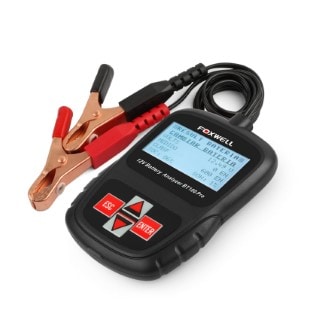
FOXWELL BT100 12V Car Battery Tester
Item specifics ชื่อแบรนด์: MAOZUA
ประเภทรายการ: ทดสอบแบตเตอรี่
เวอร์ชั่นฮาร์ดแวร์: Foxwell BT100
เวอร์ชั่นซอฟต์แวร์: ใหม่
ชื่อรุ่น: BT100
พลังงาน: 24W
แรงดันไฟฟ้า: 12V
รับรองการทดสอบภายนอก: CE
ความยาวของรายการ: 11 นิ้ว
ความกว้างของรายการ: 7 นิ้ว
ความสูงของรายการ: 3 นิ้ว
รายการน้ำหนัก: 0.5 กิโลกรัม
ประเภทวัสดุ: Plastic
อิเล็กทรอนิกส์: ไม่
ประเภท: Foxwell BT100 เครื่องทดสอบแบตเตอรี่
รับประกัน: หนึ่งปี
การจัดส่งสินค้า: รวดเร็วและปลอดภัย
คุณภาพ: 100% เดิม
คุณสมบัติวิเคราะห์แบตเตอรี่: เครื่องทดสอบแบตเตอรี่
ทรัพย์สิน: จอแสดงผล LED
แรงดันไฟฟ้าของระบบ: 12 โวลต์
Foxwell BT100 ภาษาที่รองรับ 1: อังกฤษ, ฝรั่งเศส, เยอรมัน, อิตาลี, ดัตช์, โปแลนด์,
Foxwell BT100 ภาษาที่รองรับ 2: โปรตุเกส, รัสเซีย, สเปนและตุรกี
Foxwell BT100 ฟังก์ชั่น: ตรวจจับเซลล์ที่ไม่ดี Product Description FOXWELL BT100 Pro 12 โวลต์ดิจิตอลทดสอบแบตเตอรี่รถยนต์สำหรับน้ำท่วม, ประชุมผู้ถือหุ้น, เจล BT100 12 โวลต์วิเคราะห์แบตเตอรี่รถยนต์ CCA หลายภาษา
VIDEO 1.Brief Instruction : เครื่องวิเคราะห์แบตเตอรี่รุ่นล่าสุด BT100 PRO 12 โวลต์จาก Foxwell ได้รับการพัฒนาโดยเฉพาะเพื่อทดสอบน้ำท่วมปกติ 12V, แผ่นแบน AGM, เกลียว AGM และแบตเตอรี่เจลเป็นโซลูชันต้นทุนต่ำ เป็นวิธีแก้ปัญหาที่รวดเร็วง่ายและราคาไม่แพงสำหรับช่างเทคนิคเพื่อตรวจสอบสภาพแบตเตอรี่และข้อบกพร่อง
2.Support Multi-Languages : English, French, German, Italian, Dutch, Polish, Portuguese, Russian, Spanish, and Turkish.
3.Battery Tester Range: from 100 to 1100CCA 4.Features and Benefits : แอปพลิเคชั่นยานพาหนะหลากหลาย - รถยนต์นั่งและรถบรรทุกขนาดเล็ก
ทดสอบแบตเตอรี่ที่ได้รับคะแนนตั้งแต่ 100 ถึง 1100CCA
ทดสอบแบตเตอรี่หลายประเภท - น้ำท่วมปกติ, แผ่นแบน AGM, เกลียว AGM และเจล
ทดสอบระบบการจัดเรตหลายแบบ - CCA, BCI, CA, MCA, JIS, DIN, IEC, EN, SAE
ทดสอบแบตเตอรี่บนรถยนต์โดยตรงไม่จำเป็นต้องถอดแบตเตอรี่ออก
ตรวจจับเซลล์ที่ไม่ดี
แสดงผลการทดสอบที่รวดเร็วและแม่นยำในเวลาเพียง 3 วินาที
ไม่ปล่อยแสงความร้อนหรือประกายไฟหรือคายประจุแบตเตอรี่ - ช่วยให้การทำงานปลอดภัยสำหรับผู้ใช้ทุกระดับ
ชดเชยอุณหภูมิอัตโนมัติ
ใช้งานง่ายมากด้วยหน้าจอ LCD ขนาดใหญ่และการใช้งานเมนู 5.Battery Test: 1. กดปุ่ม ENTER เพื่อเริ่มการทดสอบ ค้างคาว. LOCATION Menu จะปรากฏขึ้น 2. เลื่อนด้วยปุ่มขึ้นหรือลงเพื่อไฮไลต์ OUT of VEHICLE หรือ IN VEHICLE จากเมนู BATTERY LOCATION และกด ENTER เพื่อเลือกตำแหน่งแบตเตอรี่ 3. เลื่อนด้วยปุ่มขึ้นหรือลงเพื่อเลือกประเภทแบตเตอรี่จากเมนู BATTERY TYPE แล้วกด ENTER เพื่อยืนยัน 4. เลื่อนด้วยปุ่มขึ้นหรือลงเพื่อเลือกมาตรฐานแบตเตอรี่จากเมนูแบตเตอรี่มาตรฐานแล้วกด ENTER เพื่อยืนยัน ระบบการให้คะแนนอาจมีไม่ครบทุกแอปพลิเคชัน 5. ใช้ปุ่มขึ้นหรือลงเพื่อเปลี่ยนช่วงการวัดจนกว่าคุณจะเข้าสู่ช่วงที่ถูกต้องของแบตเตอรี่ของคุณ กด ENTER เพื่อเริ่มการทดสอบ 6. ดูผลการทดสอบบนหน้าจอ ขึ้นอยู่กับสถานะของแบตเตอรี่หนึ่งในผลการทดสอบต่อไปนี้อาจปรากฏขึ้น
Package Detail:
1 x FOXWELL BT100 12V Car Battery Tester
วิธีการสั่งซื้อ
– สะดวกต่อการเช็ค สถานะสินค้า
– ลูกค้าสมารถเข้ามาเช็ค สถานะของสินค้าที่สั่งซื้อได้ตลอดเวลา
– สะดวกต่อการ ย้อนกลับมาสั่งซื้อภายหลัง โดยไม่ต้องกรอกที่อยู่ใหม่
– มีหลักฐาน สถานะการสั่งซื้อ เก็บไว้ดูภายหลัง ในบัญชีของท่านเอง
– สามารถได้รับข้อมูลข่าวสาร ใหม่ๆ
– เข้าสู่ระบบ ง่ายๆ เพียง กรอก E-mail กับ Password ของท่าน.
2. ติดต่อสั่งซื้อผ่านทาง LINE ID: @kts-mall
QR CODE
3.
4. E-Mail: klongthomshopping@gmail.com
E-Mail: contact@klongthomshoppingmall.com
5. สั่งซื้อผ่านทางโทรศัพท์
02-1021772, 02-9462590, 081-8231408, 088-6447779
—————————————————————–
วิธีการชำระเงิน
ลูกค้าสามารถชำระเงิน โดยการโอนเงินฝ่านทาง ATM, Internet Banking, หรือที่ทำการธนาคาร
หมายเลขบัญชี สำหรับการชำระเงิน
1. 2. 053-6-02904-0 A/C.กระแสรายวัน บจก. เคทีเอส มอลล์
3. รับชำระผ่านทาง บัตรเครดิต ได้ที่ร้าน
3. ชำระผ่านทาง Paypal ที่ A/c. sam51624@gmail.com
* ในกรณีลูกค้า มีความสงสัยใดๆ หลังจากชำระเงินไปแล้ว ให้ติดต่อมาที่ร้านได้โดยตรง ไม่ต้องเกรงใจ ซึ่งเรื่องต่างๆ จะได้จบลงโดยการเจรจา และทางร้านจะทำการคืนเงินให้กับลูกค้าทันที โดยไม่ต้องเปิดข้อพิพาทที่ เว็บ paypal ซึ่งทำให้เสียเวลาและเครดิตของผู้ซื้อและผู้ขาย
และเพื่อความรวดเร็วในการจัดส่ง หลังจากลูกค้าชำระเงินแล้ว ให้โทรแจ้ง หรือ ส่งข้อความ, แจ้งชำระเงินผ่านทาง E-mail หน้าเว็บด้วย จะทำให้ทางเรารับทราบและเช็คได้เร็วขึ้น
——————————————-
นโยบายการคืนเงินและคืนสินค้า
การคืนสินค้า และการคืนเงิน
1.นโยบายการคืนสินค้า ลูกค้าสามารถทำการเปลี่ยน/คืนสินค้าใดๆ ก็ตามที่ชำรุด หรือยังไม่ได้เปิดใช้งานภายในระยะเวลา 7 วัน นับจากวันที่ท่านได้รับสินค้า (โดยถือตามเอกสารการรับสินค้าเป็นหลัก) โดยสินค้าที่จะทำการส่งคืนจะต้องอยู่ในสภาพเดิมเหมือนกับตอนที่ท่านได้รับสินค้า โดยทางบริษัทจะทำการเปลี่ยน/คืนสินค้า ภายใต้เงื่อนไข ดังนี้ สินค้ามีสภาพชำรุด เสียหาย และไม่สามารถใช้งานได้ตามปกติ สินค้าส่งผิดรุ่น ผิดสี หรือขนาด หมายเหตุ สินค้าต้องไม่ผ่านการใช้งาน/ หรือสามารถลองสินค้าได้ แต่ต้องอยู่ในสภาพที่ใหม่ สินค้าจะต้องคืนมาพร้อมบรรจุภัณฑ์ของสินค้าและอุปกรณ์เสริม หากท่านรับสินค้าไปเกิน 7 วัน ทางบริษัทขอสงวนสิทธิ์ในการรับคืนสินค้าจากท่าน กรณีสินค้าที่เป็นลดราคา (Stock Clearance) ทางบริษัทขอสงวนสิทธิ์ในการคืนสินค้าหรือคืนเงินทุกกรณี
2.วิธีการส่งคืนสินค้า หากท่านต้องการส่งสินค้าคืน กรุณาดูรายละเอียดเกี่ยวกับนโยบายการคืนสินค้า เพื่อตรวจสอบว่าสินค้าส่งคืนของท่านอยู่ในเงื่อนไขการส่งคืนสินค้า หากท่านต้องการคืนสินค้า/เปลี่ยนสินค้าชิ้นใหม่ กรุณาแจ้งกับทางเราล่วงหน้า
3.ตรวจสอบสถานะการคืนสินค้า กระบวนการเปลี่ยนสินค้า / คืนเงิน จะเริ่มดำเนินการหลังจากทางบริษัทได้ทำการประเมินสินค้าที่ส่งคืนจากท่านเป็นที่เรียบร้อยแล้ว ซึ่งกระบวนการประเมินคุณภาพสินค้านี้อาจใช้เวลาประมาณ 7 วันทำการ นับจากวันที่บริษัทได้รับคืนสินค้า ท่านสามารถติดต่อสอบถามได้ที่ Call Center 02-9462590
4.ค่าใช้จ่ายในการจัดส่งสินค้าคืน หากสินค้าที่ท่านได้รับไม่ถูกต้อง ชำรุด หรือเสียหาย ทางบริษัทยินดีที่จะส่งสินค้าและทำการเปลี่ยนสินค้าให้ตามที่อยู่ที่ได้ระบุไว้ในเอกสารคำสั่งซื้อ โดยไม่มีค่าใช้จ่ายใดๆ
5.การเปลี่ยนสินค้าใหม่ ทันทีที่ทางเราได้รับสินค้าของท่านคืน ทางเราจะทำการประเมินสินค้าและตรวจสอบคุณภาพสินค้าคืนของท่าน ซึ่งการดำเนินการจะใช้เวลาการตรวจสอบประมาณ 7 วันทำการ นับจากวันที่บริษัทได้รับคืนสินค้า
6.นโยบายการคืนเงิน ทางบริษัทจะทำการคืนเงินเต็มจำนวนของรายการสั่งซื้อให้แก่ลูกค้า ในกรณีที่บริษัทไม่สามารถหาสินค้ามาเปลี่ยนหรือทดแทนสินค้าเดิมที่ท่านได้สั่งซื้อไปได้ ในกรณีการคืนเงิน ท่านจะต้องส่งเอกสารและหลักฐานทางบัญชี เพื่อให้บริษัทดำเนินการเรื่องการจ่ายเงินคืนเข้าในบัญชีธนาคารของท่าน โดยจะมีระยะเวลาในการดำเนินการประมาณ 7-15 วันทำการ และทางบริษัทจะทำการแจ้งให้ท่านทราบ เมื่อได้มีการจ่ายเงินคืนเป็นที่เรียบร้อยแล้ว ทั้งนี้บริษัทขอสงวนสิทธิ์ในการเปลี่ยนแปลงเงื่อนไขใดๆ โดยไม่จำเป็นต้องแจ้งให้ทราบล่วงหน้า
——————————————-
กลับสู่ หน้าหลัก






 ธ. กสิกรไทย สาขา ถนนนวลจันทร์ 984-2-13436-3 A/C. ออมทรัพย์ บจก. เคทีเอส มอลล์
 ธ. กรุงไทย สาขา เอกมัย เลขที่ 053-6-02904-0 A/C.กระแสรายวัน บจก. เคทีเอส มอลล์